 SCRYWOW
ScryWoW › Add-on features › Deals: auction sniper
ScryWoW add-on · Bags, gear & gold
Deals: snipe the auction house
Stand at an auction house and Deals looks for listings well under what they usually sell for, checks each one, and lists the ones worth your gold. It never buys anything on its own.
What it does
Snipes: items listed under your deal price (70% of their usual price by default). Each one is checked first: how fast it sells, how far under the next listing it is, the auction house cut, deposits and your budget. Safe mode (on by default) hides the risky ones.
Full scan: one button reads every listing in the auction house at once (the game allows it every 15 minutes). Deals says when it's ready again, because full scans find the most.
My gear: after a full scan, every weapon and armor piece you can use that beats what you're wearing, scored with your spec's stat priority (from your plan, or the spec you pick in My Planner). For a Hunter wearing Agility, Stamina and Intellect gear, it shows the listings that beat it on those stats.
Market dips, vendor flips, price gaps: whole markets under their usual price, listings cheaper than what a vendor pays, and items that sell for more at the neutral auction house (or the other way round).
Market, Selling and My buys: what's rising and falling, the best days and hours to sell, and what to do with everything you bought (sell now, wait, or cut the loss). The same insights are on the website's Gold insights page.
Looks like the auction house: the Deals window uses the game's own window frame, with Buy / Sell / Market / Settings tabs along the bottom and the pages of each tab down the left, like the auction house's own categories. Your shopping list (quest items, level 60 supplies) is a page in it.
Filters: every list has a Filter button (trade goods, consumables, recipes, weapons and armor; sells 1, 5, 20 or 100 a day), and Sell now can show one character, your alts or everyone.
Stays out of your way: click in the auction house or type in its search box and scanning waits 30 seconds for you. Walk away for 30 seconds and it starts by itself. At the auction house your backpack opens wide under the auction window, so nothing overlaps.
How to use it
- It's on for everyone. To turn it off (or back on): tracker menu (three lines) > Options > Auction house > ScryWoW Deals, or type /scry deals off. /deals opens it anywhere.
- Open an auction house. Deals opens beside it and starts scanning; press Full scan when it's ready. The full scan is shared with Auctionator and TSM (one every 15 minutes for all of them): when one of them scans, Deals reads the same list.
- Hover a deal to see why it's worth it, click the magnifier to see the listing yourself, then Buy (it asks Are you sure? first).
Good to know
- Deals is on by default and only works while you stand at an auction house. Untick it and nothing scans.
- Every purchase is your click. The game doesn't let add-ons buy on their own, and Deals wouldn't anyway.
- Usual prices come from TSM (or Auctionator, Auctioneer) plus ScryWoW's own scans. With no price add-on it learns from its own scans, so give it a few days.
- Nothing here is a sure thing: prices move, and a dip can keep dipping. The budget box (gold per day) keeps your risk where you want it.
Or download it here. Free, no ads.
Related features
Auction house helper
Tell you if an item is worth posting on the auction house or better sold to a vendor, and how fast it sells.
Loot value & group farming
Count what your loot is worth, today and per session, with a gold-an-hour bracket, and rank who looted the most in a group.
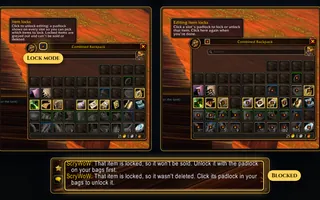
Item locks
Lock items so they're never sold or deleted by accident.
Craft your own path
ScryWoW doesn't try to replace your other add-ons. It keeps the game's own look, adds a little where it helps, and every extra has its own off switch. Start with a plan for your character, then take it into the game.