 SCRYWOW
ScryWoW › Add-on features › Item locks
ScryWoW add-on · Bags, gear & gold
Item locks: never sell or delete the wrong thing
Lock your hearthstone, your best weapon or a quest item you'll need later. Locked items can't be sold to a vendor or deleted.
What it does
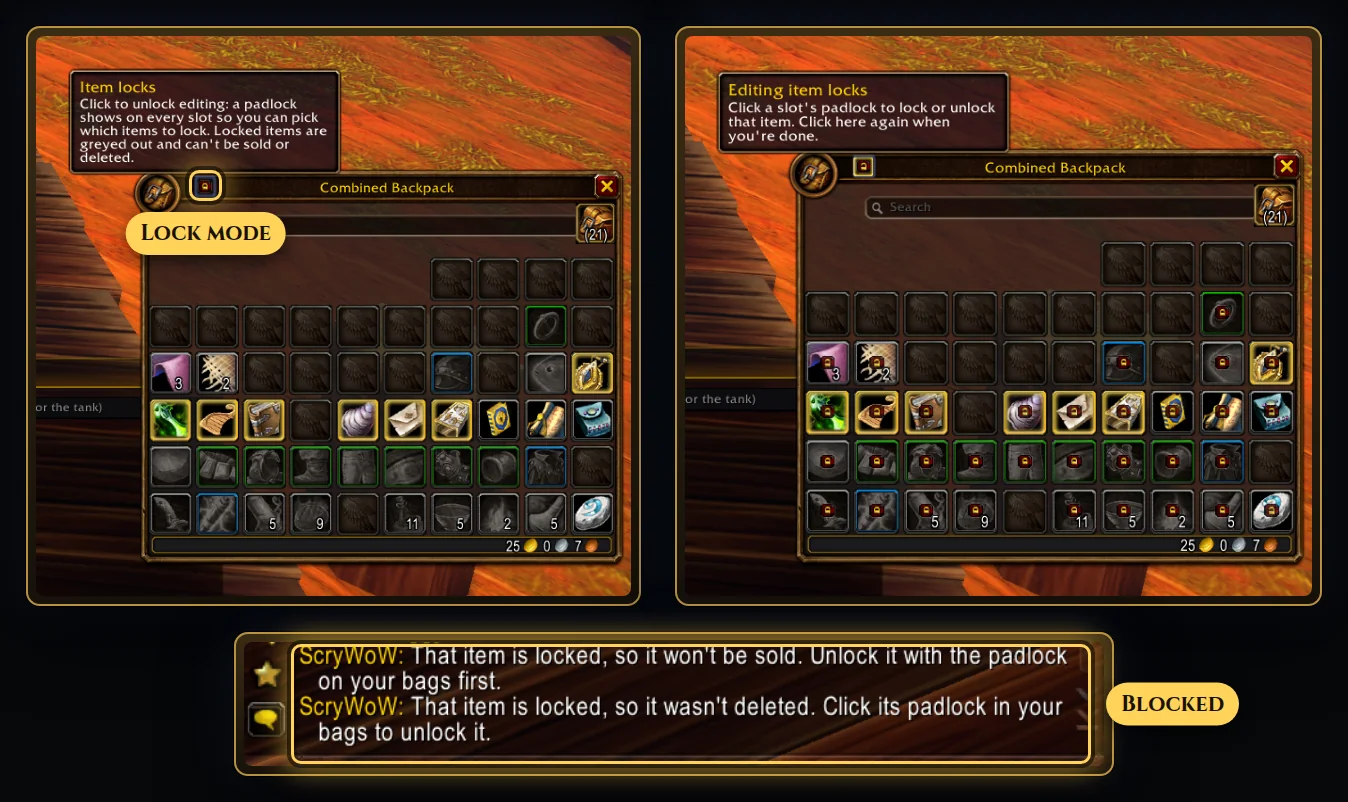
Click the padlock in your bag's title bar and every slot shows a padlock. Click the items you want to keep safe, then click the bag padlock again (or close your bags) to finish.
Locked items are greyed out: out of sight, out of mind. You can still move, equip and swap them, which makes locks great for gear-set pieces you carry around.
At a vendor, right-clicking a locked item won't sell it, and if one slips through anyway, ScryWoW buys it straight back. Try to delete a locked item and the delete is cancelled with a message. The tooltip says "Locked" so you always know.
How to use it
- Open your bags and click the padlock in the title bar.
- Click each item you want to lock. Click it again to unlock.
- Click the bag padlock again, or close your bags, to finish.
Good to know
- Locks are by item, not by slot: lock one Hearthstone and it stays locked wherever you move it, on all your characters.
- Built for the game's own bags. With a bag-replacement add-on the padlocks may not show, but delete protection still works.
- Turning the setting off hides the padlocks.
Questions
Can I still equip a locked item?
Yes. Locked items can be moved, equipped and swapped as normal. They just can't be sold or deleted.
What if I sell a locked item by accident?
Right-clicking it at a vendor won't sell it. If one ends up on the vendor anyway, ScryWoW buys it back straight away.
Or download it here. Free, no ads.
Related features
Auction house helper
Tell you if an item is worth posting on the auction house or better sold to a vendor.
Gear hints & Top Gear
Show which stats on an item your spec looks for, and list quest rewards worth a look.
Favorite players
Remember the players you meet: crafters, tanks and friends, with your own notes.
Craft your own path
ScryWoW doesn't try to replace your other add-ons. It keeps the game's own look, adds a little where it helps, and every extra has its own off switch. Start with a plan for your character, then take it into the game.