 SCRYWOW
ScryWoW › Add-on features › Gear hints & Top Gear
ScryWoW add-on · Bags, gear & gold
Gear hints for your spec
Hover any item and its stats light up by how much your spec wants them, with a hint whether it's likely a good fit. It's a guide, not a verdict. The Top Gear tab lists quest rewards worth a look.
What it does
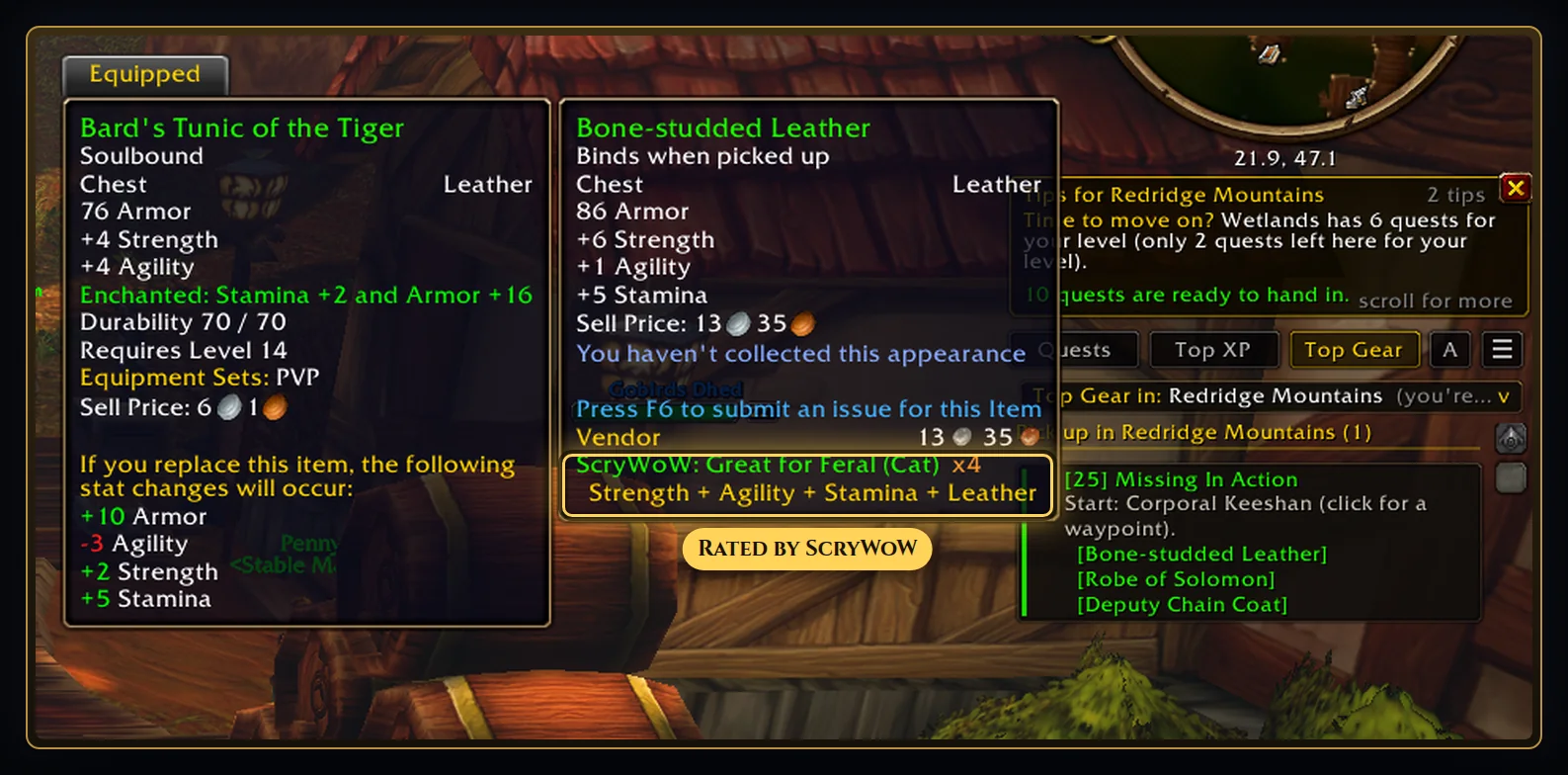
Hover an item anywhere (bags, loot, vendors, quest rewards) and the tooltip gives a gentle hint: likely a good fit, could suit or probably not for your spec. It's an estimate from your spec's stat priority, not a promise: the item's real value depends on what you're wearing and how you play.
Under it, every stat on the item shows as a small colour-coded badge: green for the stats your spec wants most, gold for useful ones, pale for nice-to-have and grey for stats your spec doesn't look for. Your weapon type and armor type show in blue when they match. Two or more stats your spec looks for? It says the item is worth a closer look.
If you picked an off-spec, it says when an item suits that too. Group loot rolls and quest rewards get a quiet heads-up when something looks like an upgrade.
The Top Gear tab lists quest rewards you can use with a stat you want, likely upgrades over what you wear first: in your quest log, to pick up in this zone, and next in a chain you're on. Its dropdown checks other zones and dungeons.
How to use it
- Make your character on the website (spec and off-spec) and bring the plan into the game.
- Hover any item: the hint and the stat badges sit at the bottom of the tooltip.
- Open the Top Gear tab to see which quests to do for gear.
Good to know
- It reads the stats on the item and your spec's stat priority. It doesn't know about set bonuses, special effects or what the rest of your gear is doing, so treat it as a quick hint, not a verdict.
- Your spec and off-spec come from the character you made on the website.
Or download it here. Free, no ads.
Related features
Craft your own path
ScryWoW doesn't try to replace your other add-ons. It keeps the game's own look, adds a little where it helps, and every extra has its own off switch. Start with a plan for your character, then take it into the game.