 SCRYWOW
ScryWoW › Add-on features › Stat priority
ScryWoW add-on · Bags, gear & gold
Stat priority on your character sheet
Open your character window and see which stats to look for, in order, for your spec, plus who else rolls on the same gear.
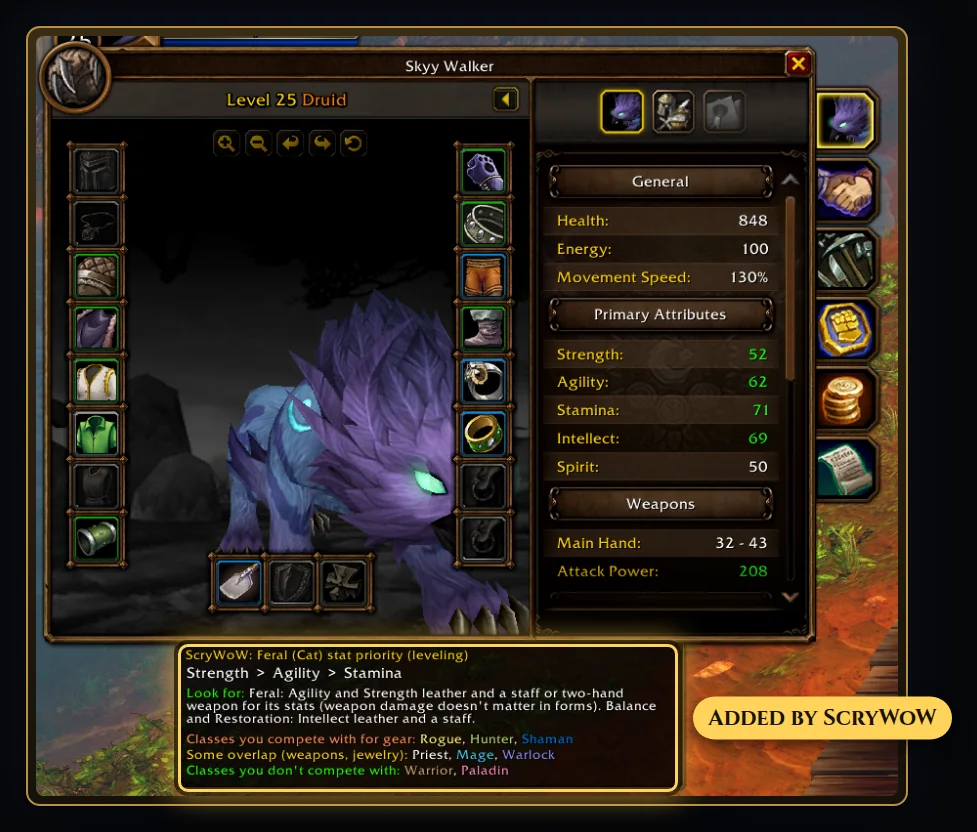
What it does
A small ScryWoW: Stats button sits under your character window. Click it to open a panel with your stat priority for right now (leveling, then level 60 once you're close) and the good, moderate and bad stats for your spec. Click again to close it; it stays out of the way of other add-ons until you want it.
It also says what kind of gear to look for, and which classes compete with you for the same items, in their class colours. Hover it for the details.
How to use it
- Make your character on the website and bring the plan into the game.
- Open your character window (C) and click ScryWoW: Stats under it, or type
/scry stats.
Good to know
- It uses the spec you picked on the website.
- The same stat priority is on the website's Gear page for your character.
Or download it here. Free, no ads.
Related features
Craft your own path
ScryWoW doesn't try to replace your other add-ons. It keeps the game's own look, adds a little where it helps, and every extra has its own off switch. Start with a plan for your character, then take it into the game.